TL;DR – What’s new?
This release covers two areas: Modern Search, with two improvements that make it faster for learners to find the right content, and Events, with a new way to filter by location.
Learners can now narrow search results by how long a Learning Experience takes, and activity type filtering has been simplified into a single, smarter dropdown. On the admin side, Events can now be filtered by location, alongside a batch of smaller fixes and enhancements across the platform.
Modern Search: Filter by Duration
What it is
Learners can now filter search results by how long a Learning Experience takes: Not set, 1-30 mins, 31-60 mins, 61-120 mins, or Over 120 mins.
Why you’ll love it
No more opening a handful of promising-looking results just to find out they don't fit into the time available. Learners can filter straight down to content that matches the time they have, whether that's ten minutes between meetings or shifts, or a longer session set aside for learning.
How to use it
Select one or more Duration options from the filter sidebar or drawer on Modern Search. Selections combine with any other active filters and search terms, and multiple Duration options can be selected at once. Your selection is preserved on reload and when a search link is shared.
Modern Search: Simplified Learning Experience Type Filtering
What’s changed
The two separate “Activity Type” dropdowns in the Modern Search Advanced Filter panel have been replaced with a single “Learning Experience Type” dropdown.
Why you’ll love it
Fewer clicks, less confusion. The new dropdown also only shows types actually in use at your organisation, ordered by how commonly they're used, so learners see relevant options first; and filtering now works consistently with how it already works on the Discover page.
How to use it
Open the Advanced Filter panel on Modern Search and select one or more options from the Learning Experience Type dropdown. Search results update to match your selection alongside any other filters and search terms in place.
Events Admin: Filter by Location
What it is
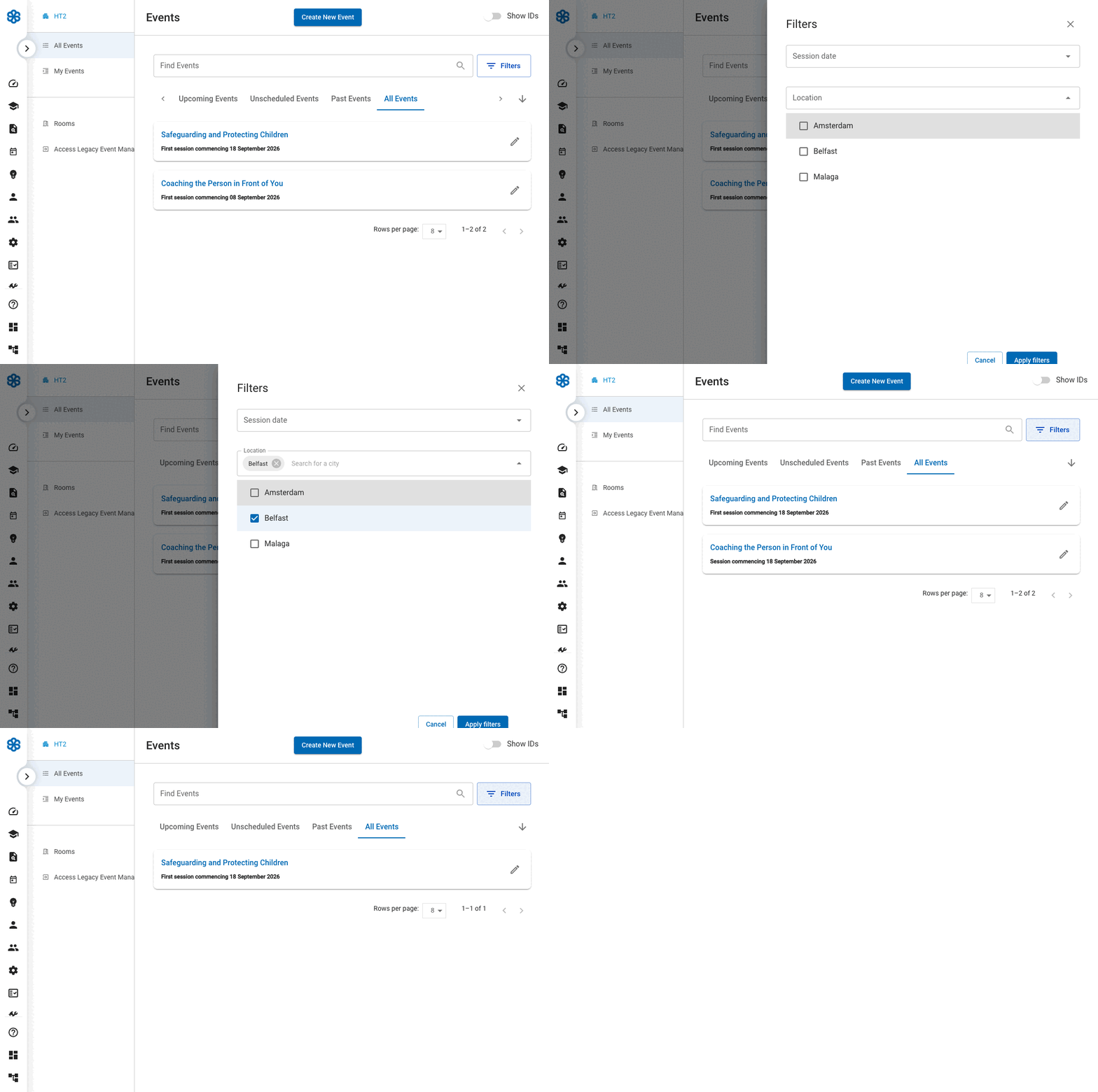
Admins can now filter the Events list by location. A new Location field sits in the Filters panel, alongside the existing date filter.
Why you’ll love it
If you run events across multiple sites, you no longer need to scroll through every event to find the ones in a specific city. Narrow the list down in one step, combined with your other filters.
How to use it
Open Filters on the Admin Events page, start typing a city into the Location field, select one or more from the list, and click Apply Filters. Selected cities appear as removable chips, and the results update to match.
Bug fixes and small enhancements
- Custom fields now support Checkbox and Date/Time field types, alongside Short Text and Selection.
- The City field on the Admin Events Location filter no longer shows duplicate or inconsistent entries.
- Advanced Reporting CSV exports now show a clear error if the export fails, rather than appearing to succeed with an empty file.
- Fixed an issue where re-assigning a playlist via a second group could leave a learner unable to access a course tile, showing a “not enrolled” error.
- SCORM packages using certain file extensions now load correctly.
- CPD report text now displays in the learner's selected language, rather than defaulting to English.
- Fixed an issue where the “Remember Me” login option could bypass an account's expiry date.
- Names containing an ampersand (&) - for tags, Learning Experiences, badges, and user profiles - now display correctly instead of showing as “&”.
- Fixed incorrect remaining sign-up counts on the learner Events page for events linked to multiple Learning Experiences.
- Assessment resources now correctly go through the Manager Sign-Off step before XP is awarded.
- Booking confirmation emails for online events no longer show unused Room and Location placeholder text.
- Improved spacing in the "About this schedule" section for better readability.
- Event dates in the Learner Events views (My Events, Available Events, Past Events) now display in a clearer DD Month Year format.
- Removed the event description from the main Admin Events page to reduce clutter — it's still available from the event's detail view.
Future developments
We are working on lots of new features and functionality. Find out more on our roadmap here! If you have any questions, please reach out to your Confirm contact.